
Packaging master data changes. Suppliers reduce carton weight, the warehouse switches mailers, variants are repacked and shipping materials are replaced. If a report for last quarter is rebuilt from the current master data, the result can change even though the underlying orders did not. That is why PackVerity uses a frozen order packaging snapshot.
Master data answers “what should we use now?”
Product packaging fields and shipping profiles are master data. They describe the packaging configuration currently associated with a product, variation or shipment. They are meant to be editable because operations change.
An order snapshot answers “what did this order record?”
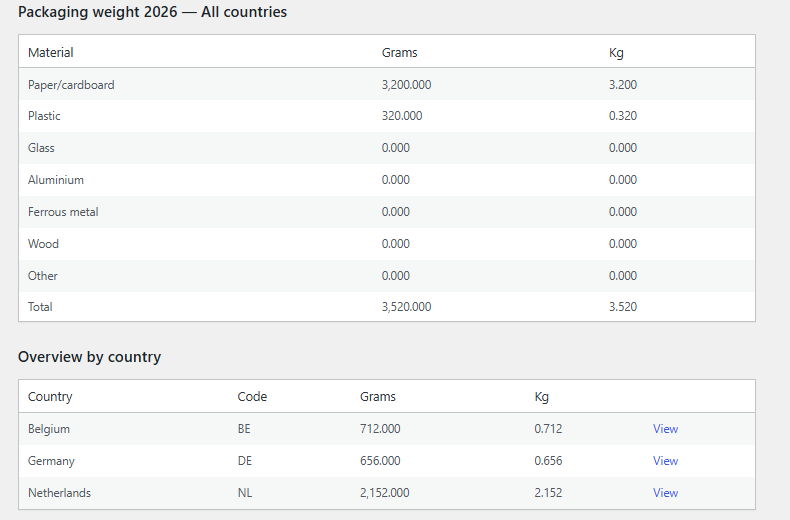
When an order reaches a configured relevant status, PackVerity calculates the packaging by material and stores the result for that order. That record can then be aggregated later without depending on whichever values happen to be current in the catalogue.
Editing the shipping profile in March should not silently convert February’s already recorded orders from 180 g to 150 g.
What goes into the snapshot
The order calculation combines the packaging values for the products or variations, the order quantities and the selected shipping packaging profile. PackVerity then stores the order-level material record that feeds the dashboard and summary export.
Refunds are not automatically the same as packaging reversal
A commercial refund can occur after packaging was already used and shipped. PackVerity therefore keeps refund-aware product quantity handling optional and off by default. Stores can choose the handling that matches their own reporting policy rather than having the software silently remove physical packaging whenever money is returned.
Free records versus deeper audit workflows
PackVerity Free provides order-level packaging records and a frozen snapshot workflow. The separately distributed Professional edition adds deeper historical and append-only audit tooling. The Free plugin remains useful on its own and does not require an account or licence service.
Why this matters beyond one report
A frozen snapshot makes debugging and reconciliation easier. If a total looks surprising, you can reason from the order record instead of asking which product profile was active months ago. That is useful even when the final filing or downstream report is created elsewhere.
Related guides
- Packaging reporting from stored records
- Reusable packaging profiles
- Packaging audit trail: Free vs Professional
- Summary CSV export
Frequently asked questions
What is a WooCommerce packaging snapshot?
It is the packaging calculation stored for an order so the historical record does not depend on future edits to product or shipping packaging master data.
Does PackVerity recalculate old orders every time I edit a profile?
No. The stored order record is intended to preserve the values associated with that order.
Are refunds automatically removed from packaging totals?
Refund-aware product quantity handling is optional and off by default because a refund does not necessarily mean the packaging was never placed into circulation.
Is the full audit trail included in Free?
Free includes order-level records and snapshots. Deeper append-only audit and historical workflows are part of the separately distributed Professional edition.