
Most stores use the same small set of boxes, mailers, tape combinations and fillers again and again. Re-entering those weights for every order is unnecessary, but relying only on one global “default box” is too crude when different orders ship differently. A WooCommerce packaging profile solves that middle ground: define the shipping packaging once, give it a clear name, and select the profile that applies to the order.
What a packaging profile should represent
A useful profile describes the packaging that is added at shipment level, not the product packaging already attached to the item. Typical examples are a small cardboard box with tape, a padded paper mailer, a large carton with void fill, or another recurring outbound setup.
If an order contains two products, the shipping profile is normally added once to the order record while each product contributes its own packaging by quantity.
Why product packaging and shipping packaging should be separate
A product can arrive in its own retail box, sleeve, bottle or protective wrap. The warehouse then adds the shipping box, envelope, tape or filler. Those are different layers of packaging and they change for different reasons. Keeping them separate makes the calculation easier to explain and easier to update.
How PackVerity Free uses shipping profiles
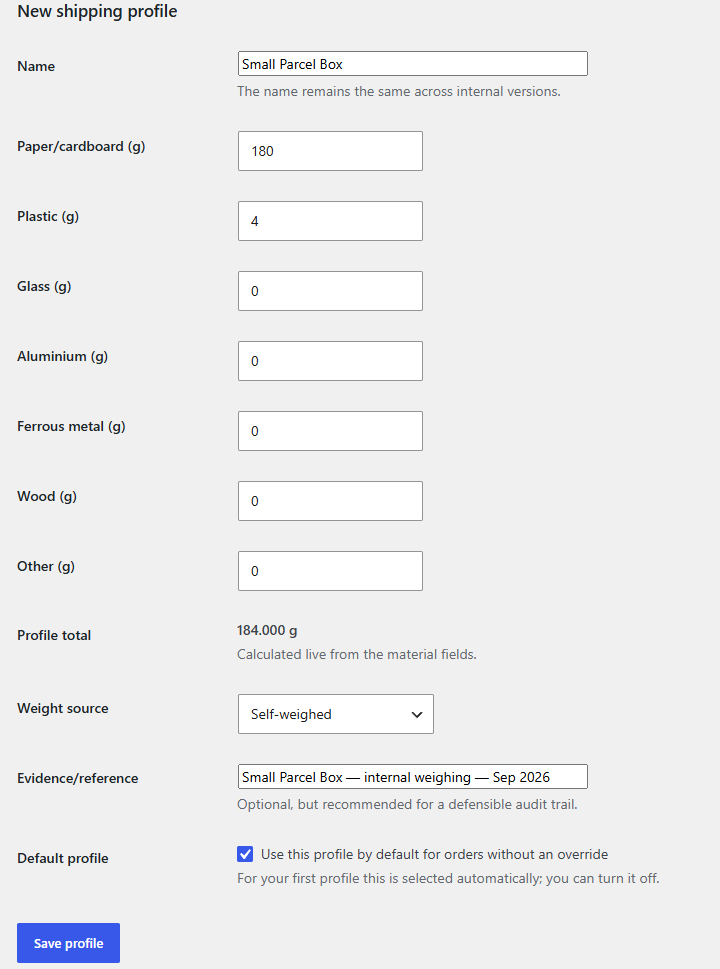
- Create reusable shipping packaging profiles with weights by material.
- Choose a default profile for common orders.
- Select a different profile on an individual order when reality differs from the default.
- Store the selected shipping packaging in the order snapshot together with product packaging.
- Aggregate the resulting material records by year, destination country and material.
Changing a profile should not rewrite old orders
Packaging changes over time. A carton may become lighter, a mailer may be replaced, or tape may change. If reporting is recalculated from today’s profile values, historical orders can silently move. PackVerity instead freezes the packaging calculation into the order record, so editing the master profile affects future calculations rather than rewriting already stored order records.
Profile naming matters more than it looks
Use operational names that warehouse staff can recognise: “Small carton 250 × 180”, “Paper mailer A4”, or “Large export carton”. Avoid names such as “Profile 1”. The goal is to make the selected profile understandable when somebody reviews an order months later.
Packaging profiles are source data, not legal classifications
The material groups in PackVerity are an operational data model. A reporting scheme may require a different set of legal categories. Store the underlying weights consistently, then validate any market-specific mapping separately.
Important: PackVerity does not decide which packaging must be reported, which legal category applies, or whether a store has an EPR obligation. It records the source data used by your reporting workflow.
Related WooCommerce packaging workflows
- Product and variation packaging weights
- Shipping packaging tracking in WooCommerce
- Frozen order packaging snapshots
- Packaging reporting from stored orders
Frequently asked questions
Can I create more than one shipping packaging profile?
Yes. PackVerity Free is designed around reusable shipping profiles so different boxes or mailers can be selected for different orders.
Does a shipping profile replace product packaging?
No. Product or variation packaging and shipment-level packaging are separate inputs and are combined in the order calculation.
What happens if I edit a profile later?
New calculations can use the updated master data, while an already stored order snapshot keeps the values recorded for that order.
Does the profile automatically make a LUCID or PPWR filing?
No. It records packaging source data; legal mapping and filing requirements remain separate.