
WooCommerce knows the shipping method, destination and order contents, but it does not natively know which physical box, mailer, tape or filler was used. That matters whenever a packaging total is expected to include shipment packaging as well as the packaging attached to the product itself.
What belongs in shipping packaging?
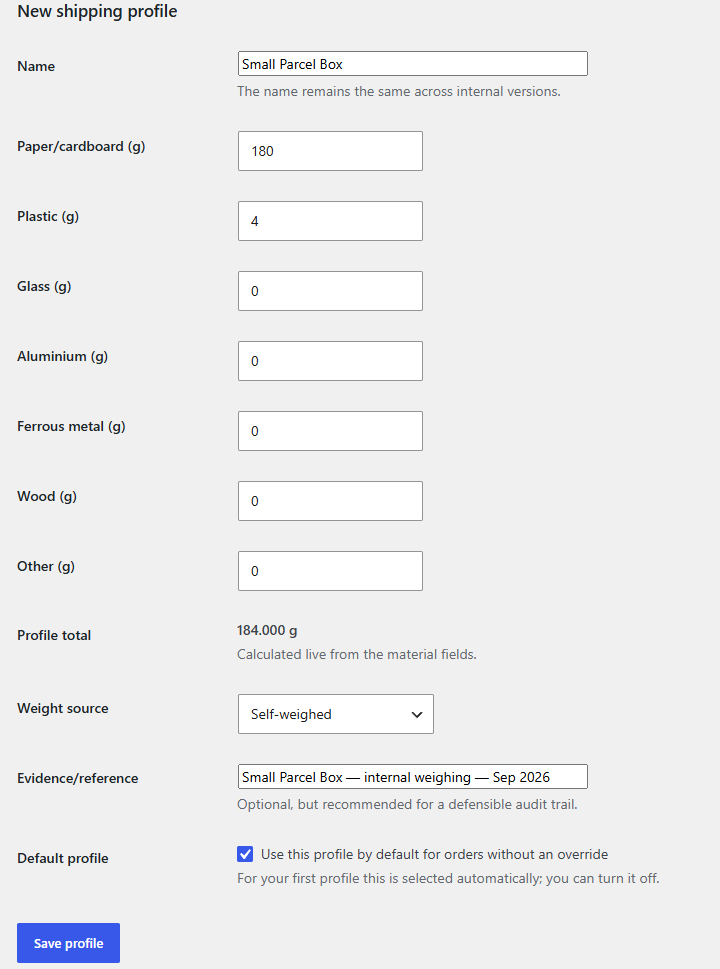
Typical shipment-level packaging includes the outer carton or mailer, tape, protective fill, paper padding and other materials added while preparing the parcel. Whether a specific component belongs in a particular legal report depends on the applicable rules; PackVerity’s job is to give you a structured operational record of what you used.
Why a default profile is useful — and why an override matters
Many stores ship most orders in one common pack. A default shipping profile makes that workflow fast. But not every order is typical. A larger box, different mailer or special protection should be selectable on the order so the stored packaging record follows the actual shipment rather than a global assumption.
This keeps per-unit packaging separate from the shipment-level materials added once for the parcel.
Do not infer packaging from the shipping method alone
A “Standard shipping” method can still use several physical packs depending on order size. Shipping method is useful context, but it is not automatically a packaging specification. If the physical pack matters, record the profile that was actually used.
How shipping packaging affects reporting
When order records are aggregated, shipping packaging contributes to the same material totals as product packaging. That lets a report answer a more useful question than “what did the products contain?”: what packaging mass was associated with the orders in the selected year and destination country?
International orders make the distinction more important
Export orders may use stronger cartons, more void fill or different protective materials than domestic shipments. A separate shipping profile can capture that operational difference without changing the packaging master data on every product.
Related guides
- WooCommerce packaging profiles
- Product and variation packaging
- Order-level packaging snapshots
- WooCommerce packaging reporting
Frequently asked questions
Can I set a default shipping packaging profile?
Yes. PackVerity Free supports a default shipping packaging profile and lets the order use another profile when needed.
Is shipping packaging counted separately from product packaging?
Yes. The inputs are separate and are combined in the order-level material calculation.
Can I change the shipping profile for a specific order?
Yes. PackVerity supports per-order shipping packaging selection.
Does PackVerity know which legal packaging category a box belongs to?
No. It records the material source data; legal classification remains part of the reporting workflow.