
“Product weight” and “product packaging weight” are not the same field. A 500 g product might have 24 g of paper/cardboard packaging and 3 g of plastic. If that packaging is relevant to your reporting workflow, it needs its own structured values rather than being inferred from the product’s shipping weight.
Store packaging by material, not as one combined number
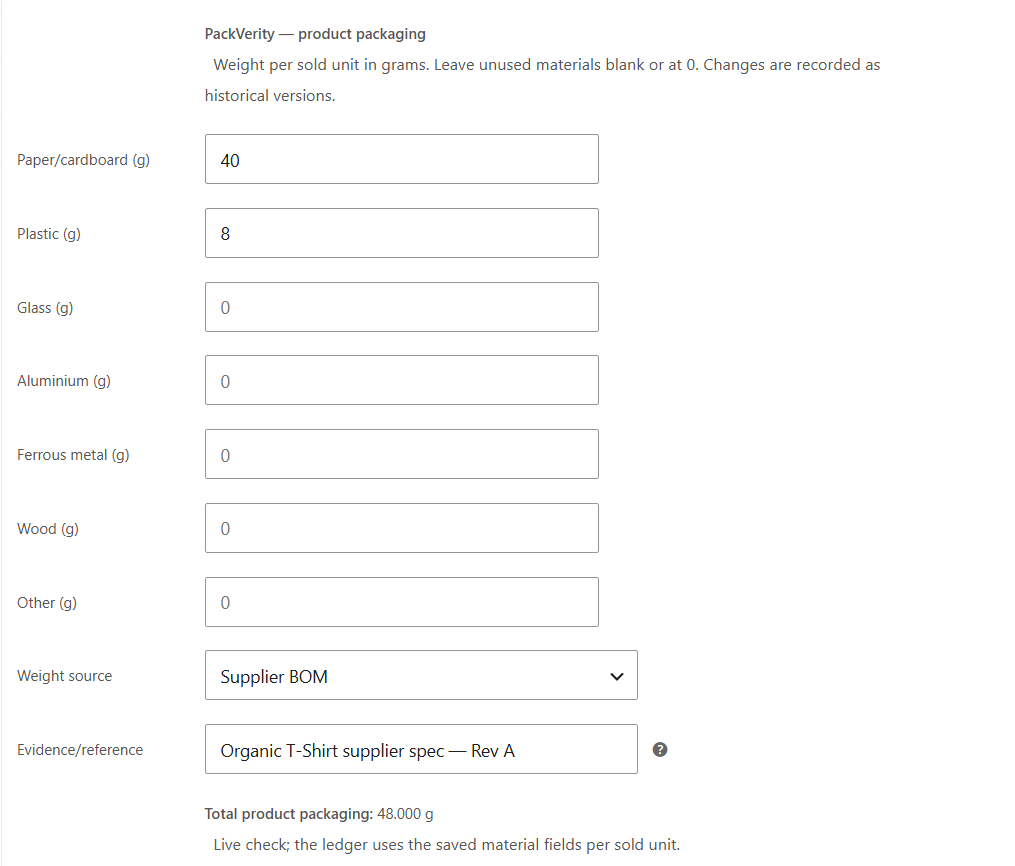
A single “packaging weight = 27 g” value is hard to use when reports require material totals. PackVerity Free separates packaging into paper/cardboard, plastic, glass, aluminium, ferrous metal, wood and other so the order record can preserve the breakdown.
For quantity 3, the product contributes 72 g paper/cardboard and 9 g plastic before shipping packaging is added.
Variations need their own packaging when the pack actually changes
WooCommerce variations can represent different sizes, volumes or formats. If a 250 ml variation uses a small bottle and carton while the 1 litre version uses heavier packaging, one parent-level packaging value will distort every order containing the larger or smaller variant. PackVerity therefore supports packaging fields on variations.
Keep evidence next to the number
PackVerity Free includes optional source and reference fields for packaging master data. Those fields can point to where a number came from: for example a supplier specification, internal weighing record or another documented source. This does not make the value legally validated, but it reduces the “where did this number come from?” problem later.
Do not over-model packaging that never differs
If every variation genuinely uses identical packaging, separate variation values add maintenance without improving the data. Use the most specific level that reflects reality. The purpose is repeatable source data, not maximum field count.
From product packaging to order packaging
At order time, the product or variation packaging is multiplied by the quantity. A shipping packaging profile is then added at order level. PackVerity stores the resulting material record with the order so later master-data edits do not retroactively replace the historical record.
Related guides
- Packaging weight per WooCommerce order
- Reusable packaging profiles
- Shipping packaging in WooCommerce
- Packaging data checklist
Frequently asked questions
Does PackVerity use the standard WooCommerce product weight field?
No. PackVerity stores packaging weights in separate fields because product weight and packaging material weight serve different purposes.
Can WooCommerce variations have different packaging weights?
Yes. PackVerity Free supports variation-specific packaging values.
Which materials can I record?
Paper/cardboard, plastic, glass, aluminium, ferrous metal, wood and other.
Can I store where a packaging weight came from?
Yes. Optional source/reference fields can be stored with packaging master data.